
Search results
Published: March 2019
Working Example
- Results (English)
- Résultats (Français)
- Results contextual (English)
- Résultats contextuels (Français)
- Partial Results with filters (English)
- The "show more" link in the filter box aren't working via a client side implementation.
- The "Clear all" link at the top of the filter box aren't working via a client side implementation.
- Partial Résultats avec filtres (Français)
- The "show more" link in the filter box aren't working via a client side implementation.
- The "Clear all" link at the top of the filter box aren't working via a client side implementation.
- Results advanced (English)
- Résultats avancés (Français)
- Advanced search (English)
- Recherche avancée (Français)
- Results - did you mean (English)
- Résultats - voulez-vous dire (Français)
- Results - error (English)
- Résultats - erreur (Français)
- Results - no results (English)
- Résultats - aucun résultat (Français)
Prototype:
- gc-proto/student-loans: Search results visual
- gc-proto/student-loans: Search result contextual visual
- Draft specification for search page
Test pages
Backlog
Their is not GCWeb corresponding template yet
- Backlog Starting page for search (Reference/Existing implementation)
Usability Research
- - First click testing UX research 2018-2 Contextual site search design research
- - Moderated usability testing - UX research 2018-2 Contextual site search design research
Version history
- Version 3.1 - Alignement of Search UI with GCWeb:
- Adjusted font sizes for h2, h3, and paragraph elements
- Created reference implementation for the "No results", "Did you mean", and "Error" in-page items
- Created working example for the Advanced Search template
- Moved search button on the Contextual Search page template to the right of the search bar
- Version 3.0 - Update search pages with a new disclaimer message to let users know not entering personal information.
- Version 2.3:
- Adding a paragraph with a unique ID in the form to let users know not entering personal information.
- Adding an aria-describedby in the input field pointing to the ID of the personal info paragraph.
- Version 2.2 - Adding data-fusion-query in the input field
- Version 2.1 - Advanced search is added under pagination tab
- Version 2 - Search results, Contextualized search result, Faceted results
- Version 1 - Undocumented search results template. Associated with the version 1.x of the Canada.ca Content and IA specification
Search template roadmap
Last updated:
- Review each working example: Results, Result contextual and Result with filters
- Collapsible/Expandable feature when multiple labels in a search result item.
- Collapsible/Expandable available filters, add a "Show more" button
- Perform WCAG 2.0 Level AA conformance check on each working example
- Complete the Search Template Shapes graphs
- The description should not surpass 4 rows of text on mobile screens. The description may be different in mobile than in desktop to accommodate. JS or CSS might be useful to ensure this rule are followed and enforced.
- Provide instructions on how search result item are structured to ease navigation with an assistive technology software.
Template component
- Search bar (prop: isContextual)
- Search result (prop: isContextual)
- Search results item (prop: isContextual)
- Search pagination
- Search filters
Note: visual example with styles applied: https://gc-proto.github.io/student-loans/scenarioA/services/search-results-visual.html
Wireframe
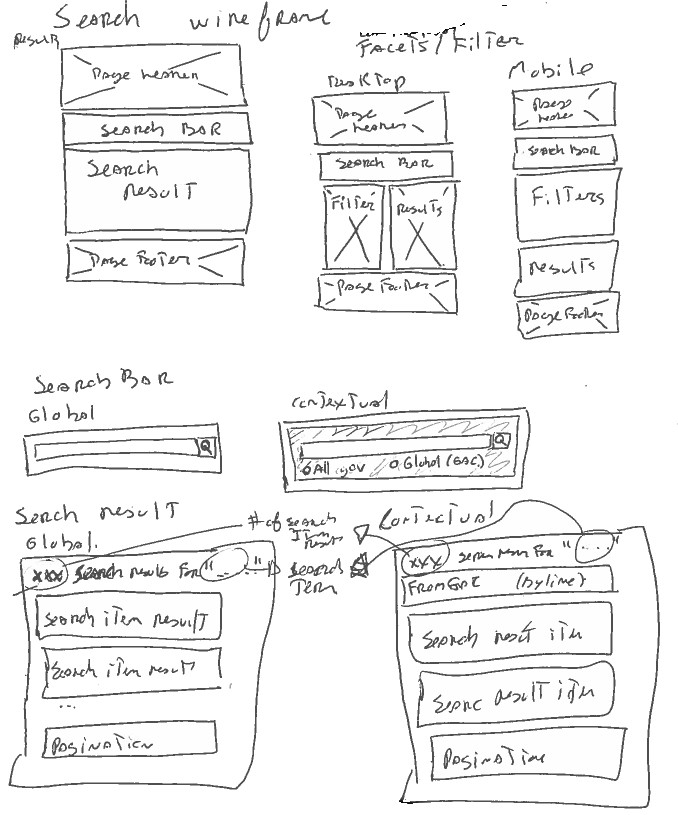
Template
The CSS class page-type-search must be added to the body element to every search result pages.
Implementer need to properly configure forms and inputs.
<h1 property="name">Search results</h1>
<!-- Search bar (mandatory) -->
<!-- Search filter (optional) -->
<!-- Search result (mandatory) -->
<!-- Advanced search link (optional) -->
Search bar
Version 3.0
<form role="search">
	<label class="wb-inv" for="sch-inp">Search Government of Canada websites</label>
	<div class="input-group mrgn-tp-lg">
		<input spellcheck="false" autocomplete="off" id="sch-inp" class="form-control" type="search" data-fusion-query aria-describedby="gc-pi" />
		<span class="input-group-btn">
			<button type="submit" class="btn btn-primary"> <span class="glyphicon-search glyphicon"></span><span class="wb-inv">Search</span></button>
		</span>
	</div>
	<p id="gc-pi" class="mrgn-tp-md">Don't include personal information (telephone, email, SIN, financial, medical, or work details).</p>
</form>
Version 2.3
<form>
	<label class="wb-inv" for="sch-inp">Search Government of Canada websites</label>
	<div class="input-group mrgn-tp-lg">
		<input spellcheck="false" autocomplete="off" id="sch-inp" class="form-control" type="search" data-fusion-query aria-describedby="gc-pi" />
		<span class="input-group-btn">
			<button type="submit" class="btn btn-primary"> <span class="glyphicon-search glyphicon"></span><span class="wb-inv">Search</span></button>
		</span>
	</div>
	<p id="gc-pi" class="mrgn-tp-md">Please <strong>do not include sensitive personal information</strong> in the search box, such as your social insurance number, personal finance data and medical or work history.</p>
</form>
Version 2.3 Vs Version 2.2
Version 2.3
<form>
	<label class="wb-inv" for="sch-inp">Search Government of Canada websites</label>
	<div class="input-group mrgn-tp-lg">
		<input spellcheck="false" autocomplete="off" id="sch-inp" class="form-control" type="search" data-fusion-query aria-describedby="gc-pi" />
		<span class="input-group-btn">
			<button type="submit" class="btn btn-primary"> <span class="glyphicon-search glyphicon"></span><span class="wb-inv">Search</span></button>
		</span>
	</div>
	<p id="gc-pi" class="mrgn-tp-md">Please <strong>do not include sensitive personal information</strong> in the search box, such as your social insurance number, personal finance data and medical or work history.</p>
</form>
Version 2.2
<form>
	<label class="wb-inv" for="sch-inp">Search Government of Canada websites</label>
	<div class="input-group mrgn-tp-lg">
		<input spellcheck="false" autocomplete="off" id="sch-inp" class="form-control" type="search" data-fusion-query />
		<span class="input-group-btn">
			<button type="submit" class="btn btn-primary"> <span class="glyphicon-search glyphicon"></span><span class="wb-inv">Search</span></button>
		</span>
	</div>
</form>
Version 2.1
<form>
	<label class="wb-inv" for="sch-inp">Search Government of Canada websites</label>
	<div class="input-group mrgn-tp-lg">
		<input spellcheck="false" autocomplete="off" id="sch-inp" class="form-control" type="search" />
		<span class="input-group-btn">
			<button type="submit" class="btn btn-primary"> <span class="glyphicon-search glyphicon"></span><span class="wb-inv">Search</span></button>
		</span>
	</div>
</form>
Search bar contextual
Version 3.1
<div class="well">
		<form class="mrgn-tp-sm" role="search">
			<label class="wb-inv" for="sch-inp">Search Government of Canada websites</label>
			<div class="input-group mrgn-tp-lg">
				<input class="form-control full-width" spellcheck="false" autocomplete="off" dir="ltr" id="sch-inp" name="q" type="search" data-fusion-query aria-describedby="gc-pi" >
				<span class="input-group-btn">
					<button type="submit" class="btn btn-primary" name="wb-srch-sub"> <span class="glyphicon-search glyphicon"></span> <span class="wb-inv">Search</span></button>
				</span>
			</div>

			<div class="mrgn-tp-md">
				<p class="wb-inv">See results from:</p>

				<ul class="list-inline mrgn-lft-sm pull-left">
					<li><a href="#">All Government of Canada websites</a></li>
					<li class="mrgn-lft-lg current" aria-current="location"><a href="#"> Context label</a></li>
				</ul>

				<div class="clearfix">
				</div>
				<div class="clearfix"></div>
			</div>
			<p id="gc-pi" class="mrgn-tp-md">Don't include personal information (telephone, email, SIN, financial, medical, or work details).</p>
		</form>
	</div>
Version 3.0
<div class="well">
		<form class="mrgn-tp-sm">
			<label class="wb-inv" for="sch-inp">Search Government of Canada websites</label>
			<input class="form-control full-width" spellcheck="false" autocomplete="off" dir="ltr" id="sch-inp" name="q" type="search" data-fusion-query aria-describedby="gc-pi" >
			<div class="mrgn-tp-md">
				<p class="wb-inv">See results from:</p>
				<ul class="radio-inline list-inline mrgn-lft-sm">
					<li><input type="radio" name="resultsfrom" id="opt-allresults" value="allresults" /> <label for="opt-allresults">All Government of Canada websites</label></li>
					<li class="mrgn-lft-lg current" aria-current="location"><input type="radio" name="resultsfrom" id="opt-context" value="context" checked="checked" /> <label for="opt-context">Context label</label></li>
				</ul>
				<div class="pull-right">
					<button type="submit" class="btn btn-primary" name="wb-srch-sub"> <span class="glyphicon-search glyphicon"></span> Search</button>
				</div>
				<div class="clearfix"></div>
			</div>
			<p id="gc-pi" class="mrgn-tp-md">Don't include personal information (telephone, email, SIN, financial, medical, or work details).</p>
		</form>
	</div>
Version 3.0 Vs Version 2.3
Version 3.0
<div class="well">
		<form class="mrgn-tp-sm">
			<label class="wb-inv" for="sch-inp">Search Government of Canada websites</label>
			<input class="form-control full-width" spellcheck="false" autocomplete="off" dir="ltr" id="sch-inp" name="q" type="search" data-fusion-query aria-describedby="gc-pi" >
			<div class="mrgn-tp-md">
				<p class="wb-inv">See results from:</p>
				<ul class="radio-inline list-inline mrgn-lft-sm">
					<li><input type="radio" name="resultsfrom" id="opt-allresults" value="allresults" /> <label for="opt-allresults">All Government of Canada websites</label></li>
					<li class="mrgn-lft-lg current" aria-current="location"><input type="radio" name="resultsfrom" id="opt-context" value="context" checked="checked" /> <label for="opt-context">Context label</label></li>
				</ul>
				<div class="pull-right">
					<button type="submit" class="btn btn-primary" name="wb-srch-sub"> <span class="glyphicon-search glyphicon"></span> Search</button>
				</div>
				<div class="clearfix"></div>
			</div>
			<p id="gc-pi" class="mrgn-tp-md">Don't include personal information (telephone, email, SIN, financial, medical, or work details).</p>
		</form>
	</div>
Version 2.3
<div class="well">
		<form class="mrgn-tp-sm">
		<label class="wb-inv" for="sch-inp">Search Government of Canada websites</label>
		<input class="form-control full-width" spellcheck="false" autocomplete="off" dir="ltr" id="sch-inp" name="q" type="search" data-fusion-query aria-describedby="gc-pi" >
			<div class="mrgn-tp-md">
				<p class="wb-inv">See results from:</p>
				<ul class="radio-inline list-inline mrgn-lft-sm">
					<li><input type="radio" name="resultsfrom" id="opt-allresults" value="allresults" /> <label for="opt-allresults">All Government of Canada websites</label></li>
					<li class="mrgn-lft-lg current" aria-current="location"><input type="radio" name="resultsfrom" id="opt-context" value="context" checked="checked" /> <label for="opt-context">Context label</label></li>
				</ul>
				<div class="pull-right">
					<button type="submit" class="btn btn-primary" name="wb-srch-sub"> <span class="glyphicon-search glyphicon"></span> Search</button>
				</div>
				<div class="clearfix"></div>
			</div>
			<p id="gc-pi" class="mrgn-tp-md">Please <strong>do not include sensitive personal information</strong> in the search box, such as your social insurance number, personal finance data and medical or work history.</p>
		</form>
	</div>
Version 2.3 Vs Version 2.2
Version 2.3
<div class="well">
			<form class="mrgn-tp-sm">
			<label class="wb-inv" for="sch-inp">Search Government of Canada websites</label>
			<input class="form-control full-width" spellcheck="false" autocomplete="off" dir="ltr" id="sch-inp" name="q" type="search" data-fusion-query aria-describedby="gc-pi" >
			<div class="mrgn-tp-md">
				<p class="wb-inv">See results from:</p>
				<ul class="radio-inline list-inline mrgn-lft-sm">
					<li><input type="radio" name="resultsfrom" id="opt-allresults" value="allresults" /> <label for="opt-allresults">All Government of Canada websites</label></li>
					<li class="mrgn-lft-lg current" aria-current="location"><input type="radio" name="resultsfrom" id="opt-context" value="context" checked="checked" /> <label for="opt-context">Context label</label></li>
				</ul>
				<div class="pull-right">
					<button type="submit" class="btn btn-primary" name="wb-srch-sub"> <span class="glyphicon-search glyphicon"></span> Search</button>
				</div>
				<div class="clearfix"></div>
			</div>
<p id="gc-pi" class="mrgn-tp-md">Please <strong>do not include sensitive personal information</strong> in the search box, such as your social insurance number, personal finance data and medical or work history.</p>
		</form>
	</div>
Version 2.2
<div class="well">
			<form class="mrgn-tp-sm">
			<label class="wb-inv" for="sch-inp">Search Government of Canada websites</label>
			<input class="form-control full-width" spellcheck="false" autocomplete="off" dir="ltr" id="sch-inp" name="q" type="search" data-fusion-query>
			<div class="mrgn-tp-md">
				<p class="wb-inv">See results from:</p>
				<ul class="radio-inline list-inline mrgn-lft-sm">
					<li><input type="radio" name="resultsfrom" id="opt-allresults" value="allresults" /> <label for="opt-allresults">All Government of Canada websites</label></li>
					<li class="mrgn-lft-lg current" aria-current="location"><input type="radio" name="resultsfrom" id="opt-context" value="context" checked="checked" /> <label for="opt-context">Context label</label></li>
				</ul>
				<div class="pull-right">
					<button type="submit" class="btn btn-primary" name="wb-srch-sub"> <span class="glyphicon-search glyphicon"></span> Search</button>
				</div>
				<div class="clearfix"></div>
			</div>
		</form>
	</div>
Version 2.1
<div class="well">
		<form class="mrgn-tp-sm">
			<label class="wb-inv" for="sch-inp">Search Government of Canada websites</label>
			<input class="form-control full-width" spellcheck="false" autocomplete="off" dir="ltr" id="sch-inp" name="q" type="search">
			<div class="mrgn-tp-md">
				<p class="wb-inv">See results from:</p>
				<ul class="radio-inline list-inline mrgn-lft-sm">
					<li><input type="radio" name="resultsfrom" id="opt-allresults" value="allresults" /> <label for="opt-allresults">All Government of Canada websites</label></li>
					<li class="mrgn-lft-lg current" aria-current="location"><input type="radio" name="resultsfrom" id="opt-context" value="context" checked="checked" /> <label for="opt-context">Context label</label></li>
				</ul>
				<div class="pull-right">
					<button type="submit" class="btn btn-primary" name="wb-srch-sub"> <span class="glyphicon-search glyphicon"></span> Search</button>
				</div>
				<div class="clearfix"></div>
			</div>
		</form>
	</div>
Search bar advanced
Version 3.1
<form role="search">
		<fieldset>
			<legend class="h3 mrgn-tp-sm">Find pages with...</legend>
			<div class="form-group">
				<label for="advseacon1">all these words:</label>
				<input name="allq" class="form-control" id="advseacon1" maxlength="100" data-fusion-query="safe" aria-describedby="gc-pi" >
			</div>
			<div class="form-group">
				<label for="advseacon2">this exact word or phrase:</label>
				<input name="exctq" class="form-control" id="advseacon2" maxlength="200" data-fusion-query="safe" aria-describedby="gc-pi" >
			</div>
			<div class="form-group">
				<label for="advseacon3">any of these words:</label>
				<input name="anyq" class="form-control" id="advseacon3" maxlength="100" data-fusion-query="safe" aria-describedby="gc-pi" >
			</div>
			<div class="form-group">
				<label for="advseacon4">none of these words:</label>
				<input name="noneq" class="form-control" id="advseacon4" maxlength="100" data-fusion-query="safe" aria-describedby="gc-pi" >
			</div>
		<p id="gc-pi" class="mrgn-tp-md">Don't include personal information (telephone, email, SIN, financial, medical, or work details).</p>
		</fieldset>
		<fieldset>
			<legend class="h3 mrgn-tp-sm">Then narrow your results by...</legend>
			<div class="form-group">
				<label for="advseacon5">pages updated:</label>
				<select class="form-control" name="fqupdate" id="advseacon5" data-fusion-query="safe"> <option selected value="">anytime</option> <option value="dateModified_dt:[NOW-1DAY TO NOW]">past 24 hours</option> <option value="dateModified_dt:[NOW-7DAYS TO NOW]">past week</option> <option value="dateModified_dt:[NOW-1MONTH TO NOW]">past month</option> <option value="dateModified_dt:[NOW-1YEAR TO NOW]">past year</option> </select>
			</div>
			<div class="form-group">
				<label for="advseacon7">site or domain:</label>
				<input name="dmn" class="form-control" id="advseacon7" maxlength="100" data-fusion-query="safe" aria-describedby="gc-pi" >
			</div>
			<div class="form-group">
				<label for="advseacon8">terms appearing:</label>
				<select class="form-control" name="fqocct" id="advseacon8" data-fusion-query="safe"> <option value="">anywhere in the page</option> <option value="title_t">in the title of the page</option> <option value="url_t">in the URL of the page</option> <option value="body_t">in the body of the page </option></select>
			</div>
		</fieldset>
		<button type="submit" class="btn btn-md btn-primary">Search</button>
	</form>
Version 3.0
<form action="#wb-land" method="get" role="form">
		<fieldset>
			<legend class="h3 mrgn-tp-sm">Find pages with...</legend>
			<div class="form-group">
				<label for="advseacon1">all these words:</label>
				<input name="allq" class="form-control" id="advseacon1" maxlength="100" data-fusion-query="safe" aria-describedby="gc-pi" >
			</div>
			<div class="form-group">
				<label for="advseacon2">this exact word or phrase:</label>
				<input name="exctq" class="form-control" id="advseacon2" maxlength="200" data-fusion-query="safe" aria-describedby="gc-pi" >
			</div>
			<div class="form-group">
				<label for="advseacon3">any of these words:</label>
				<input name="anyq" class="form-control" id="advseacon3" maxlength="100" data-fusion-query="safe" aria-describedby="gc-pi" >
			</div>
			<div class="form-group">
				<label for="advseacon4">none of these words:</label>
				<input name="noneq" class="form-control" id="advseacon4" maxlength="100" data-fusion-query="safe" aria-describedby="gc-pi" >
			</div>
			<button type="submit" class="btn btn-md btn-primary">Search</button>
		<p id="gc-pi" class="mrgn-tp-md">Don't include personal information (telephone, email, SIN, financial, medical, or work details).</p>
		</fieldset>
		<fieldset>
			<legend class="h3 mrgn-tp-sm">Then narrow your results by...</legend>
			<div class="form-group">
				<label for="advseacon5">pages updated:</label>
				<select class="form-control" name="fqupdate" id="advseacon5" data-fusion-query="safe"> <option selected value="">anytime</option> <option value="dateModified_dt:[NOW-1DAY TO NOW]">past 24 hours</option> <option value="dateModified_dt:[NOW-7DAYS TO NOW]">past week</option> <option value="dateModified_dt:[NOW-1MONTH TO NOW]">past month</option> <option value="dateModified_dt:[NOW-1YEAR TO NOW]">past year</option> </select>
			</div>
			<div class="form-group">
				<label for="advseacon7">site or domain:</label>
				<input name="dmn" class="form-control" id="advseacon7" maxlength="100" data-fusion-query="safe" aria-describedby="gc-pi" >
			</div>
			<div class="form-group">
				<label for="advseacon8">terms appearing:</label>
				<select class="form-control" name="fqocct" id="advseacon8" data-fusion-query="safe"> <option value="">anywhere in the page</option> <option value="title_t">in the title of the page</option> <option value="url_t">in the URL of the page</option> <option value="body_t">in the body of the page </option></select>
			</div>
		</fieldset>
	</form>
Version 3.0 Vs Version 2.2
Version 3.0
<form action="#wb-land" method="get" role="form">
		<fieldset>
			<legend class="h3 mrgn-tp-sm">Find pages with...</legend>
			<div class="form-group">
				<label for="advseacon1">all these words:</label>
				<input name="allq" class="form-control" id="advseacon1" maxlength="100" data-fusion-query="safe" aria-describedby="gc-pi" >
			</div>
			<div class="form-group">
				<label for="advseacon2">this exact word or phrase:</label>
				<input name="exctq" class="form-control" id="advseacon2" maxlength="200" data-fusion-query="safe" aria-describedby="gc-pi" >
			</div>
			<div class="form-group">
				<label for="advseacon3">any of these words:</label>
				<input name="anyq" class="form-control" id="advseacon3" maxlength="100" data-fusion-query="safe" aria-describedby="gc-pi" >
			</div>
			<div class="form-group">
				<label for="advseacon4">none of these words:</label>
				<input name="noneq" class="form-control" id="advseacon4" maxlength="100" data-fusion-query="safe" aria-describedby="gc-pi" >
			</div>
			<button type="submit" class="btn btn-md btn-primary">Search</button>
		<p id="gc-pi" class="mrgn-tp-md">Don't include personal information (telephone, email, SIN, financial, medical, or work details).</p>
		</fieldset>
		<fieldset>
			<legend class="h3 mrgn-tp-sm">Then narrow your results by...</legend>
			<div class="form-group">
				<label for="advseacon5">pages updated:</label>
				<select class="form-control" name="fqupdate" id="advseacon5" data-fusion-query="safe"> <option selected value="">anytime</option> <option value="dateModified_dt:[NOW-1DAY TO NOW]">past 24 hours</option> <option value="dateModified_dt:[NOW-7DAYS TO NOW]">past week</option> <option value="dateModified_dt:[NOW-1MONTH TO NOW]">past month</option> <option value="dateModified_dt:[NOW-1YEAR TO NOW]">past year</option> </select>
			</div>
			<div class="form-group">
				<label for="advseacon7">site or domain:</label>
				<input name="dmn" class="form-control" id="advseacon7" maxlength="100" data-fusion-query="safe" aria-describedby="gc-pi" >
			</div>
			<div class="form-group">
				<label for="advseacon8">terms appearing:</label>
				<select class="form-control" name="fqocct" id="advseacon8" data-fusion-query="safe"> <option value="">anywhere in the page</option> <option value="title_t">in the title of the page</option> <option value="url_t">in the URL of the page</option> <option value="body_t">in the body of the page </option></select>
			</div>
		</fieldset>
	</form>
Version 2.2
<form action="#wb-land" method="get" role="form">
		<fieldset>
			<legend class="h3 mrgn-tp-sm">Find pages with...</legend>
			<div class="form-group">
				<label for="advseacon1">all these words:</label>
				<input name="allq" class="form-control" id="advseacon1" maxlength="100" data-fusion-query="safe" aria-describedby="gc-pi" >
			</div>
			<div class="form-group">
				<label for="advseacon2">this exact word or phrase:</label>
				<input name="exctq" class="form-control" id="advseacon2" maxlength="200" data-fusion-query="safe" aria-describedby="gc-pi" >
			</div>
			<div class="form-group">
				<label for="advseacon3">any of these words:</label>
				<input name="anyq" class="form-control" id="advseacon3" maxlength="100" data-fusion-query="safe" aria-describedby="gc-pi" >
			</div>
			<div class="form-group">
				<label for="advseacon4">none of these words:</label>
				<input name="noneq" class="form-control" id="advseacon4" maxlength="100" data-fusion-query="safe" aria-describedby="gc-pi" >
			</div>
			<button type="submit" class="btn btn-md btn-primary">Search</button>
				<p id="gc-pi" class="mrgn-tp-md">Please <strong>do not include sensitive personal information</strong> in the search box, such as your social insurance number, personal finance data and medical or work history.</p>
		</fieldset>
		<fieldset>
			<legend class="h3 mrgn-tp-sm">Then narrow your results by...</legend>
			<div class="form-group">
				<label for="advseacon5">pages updated:</label>
				<select class="form-control" name="fqupdate" id="advseacon5" data-fusion-query="safe"> <option selected value="">anytime</option> <option value="dateModified_dt:[NOW-1DAY TO NOW]">past 24 hours</option> <option value="dateModified_dt:[NOW-7DAYS TO NOW]">past week</option> <option value="dateModified_dt:[NOW-1MONTH TO NOW]">past month</option> <option value="dateModified_dt:[NOW-1YEAR TO NOW]">past year</option> </select>
			</div>
			<div class="form-group">
				<label for="advseacon7">site or domain:</label>
				<input name="dmn" class="form-control" id="advseacon7" maxlength="100" data-fusion-query="safe" aria-describedby="gc-pi" >
			</div>
			<div class="form-group">
				<label for="advseacon8">terms appearing:</label>
				<select class="form-control" name="fqocct" id="advseacon8" data-fusion-query="safe"> <option value="">anywhere in the page</option> <option value="title_t">in the title of the page</option> <option value="url_t">in the URL of the page</option> <option value="body_t">in the body of the page </option></select>
			</div>
		</fieldset>
	</form>
Version 2.2 Vs Version 2.1
Version 2.2
<form action="#wb-land" method="get" role="form">
<fieldset>
			<legend class="h3 mrgn-tp-sm">Find pages with...</legend>
			<div class="form-group">
				<label for="advseacon1">all these words:</label>
				<input name="allq" class="form-control" id="advseacon1" maxlength="100" data-fusion-query="safe" aria-describedby="gc-pi" >
			</div>
			<div class="form-group">
				<label for="advseacon2">this exact word or phrase:</label>
				<input name="exctq" class="form-control" id="advseacon2" maxlength="200" data-fusion-query="safe" aria-describedby="gc-pi" >
			</div>
			<div class="form-group">
				<label for="advseacon3">any of these words:</label>
				<input name="anyq" class="form-control" id="advseacon3" maxlength="100" data-fusion-query="safe" aria-describedby="gc-pi" >
			</div>
			<div class="form-group">
				<label for="advseacon4">none of these words:</label>
				<input name="noneq" class="form-control" id="advseacon4" maxlength="100" data-fusion-query="safe" aria-describedby="gc-pi" >
			</div>
			<button type="submit" class="btn btn-md btn-primary">Search</button>
		<p id="gc-pi" class="mrgn-tp-md">Please <strong>do not include sensitive personal information</strong> in the search box, such as your social insurance number, personal finance data and medical or work history.</p>
		</fieldset>
		<fieldset>
			<legend class="h3 mrgn-tp-sm">Then narrow your results by...</legend>
			<div class="form-group">
				<label for="advseacon5">pages updated:</label>
				<select class="form-control" name="fqupdate" id="advseacon5" data-fusion-query="safe"> <option selected value="">anytime</option> <option value="dateModified_dt:[NOW-1DAY TO NOW]">past 24 hours</option> <option value="dateModified_dt:[NOW-7DAYS TO NOW]">past week</option> <option value="dateModified_dt:[NOW-1MONTH TO NOW]">past month</option> <option value="dateModified_dt:[NOW-1YEAR TO NOW]">past year</option> </select>
			</div>
			<div class="form-group">
				<label for="advseacon7">site or domain:</label>
				<input name="dmn" class="form-control" id="advseacon7" maxlength="100" data-fusion-query="safe" aria-describedby="gc-pi" >
			</div>
			<div class="form-group">
				<label for="advseacon8">terms appearing:</label>
				<select class="form-control" name="fqocct" id="advseacon8" data-fusion-query="safe"> <option value="">anywhere in the page</option> <option value="title_t">in the title of the page</option> <option value="url_t">in the URL of the page</option> <option value="body_t">in the body of the page </option></select>
			</div>
		</fieldset>
	</form>
Version 2.1
<form action="#wb-land" method="get" role="form">
		<fieldset>
			<legend class="h3 mrgn-tp-sm">Find pages with...</legend>
			<div class="form-group">
				<label for="advseacon1">all these words:</label>
				<input name="allq" class="form-control" id="advseacon1" maxlength="100" data-fusion-query="safe" >
			</div>
			<div class="form-group">
				<label for="advseacon2">this exact word or phrase:</label>
				<input name="exctq" class="form-control" id="advseacon2" maxlength="200" data-fusion-query="safe" >
			</div>
			<div class="form-group">
				<label for="advseacon3">any of these words:</label>
				<input name="anyq" class="form-control" id="advseacon3" maxlength="100" data-fusion-query="safe" >
			</div>
			<div class="form-group">
				<label for="advseacon4">none of these words:</label>
				<input name="noneq" class="form-control" id="advseacon4" maxlength="100" data-fusion-query="safe" >
			</div>
		</fieldset>
		<fieldset>
			<legend class="h3 mrgn-tp-sm">Then narrow your results by...</legend>
			<div class="form-group">
				<label for="advseacon5">pages updated:</label>
				<select class="form-control" name="fqupdate" id="advseacon5" data-fusion-query="safe"> <option selected value="">anytime</option> <option value="dateModified_dt:[NOW-1DAY TO NOW]">past 24 hours</option> <option value="dateModified_dt:[NOW-7DAYS TO NOW]">past week</option> <option value="dateModified_dt:[NOW-1MONTH TO NOW]">past month</option> <option value="dateModified_dt:[NOW-1YEAR TO NOW]">past year</option> </select>
			</div>
			<div class="form-group">
				<label for="advseacon7">site or domain:</label>
				<input name="dmn" class="form-control" id="advseacon7" maxlength="100" data-fusion-query="safe" aria-describedby="gc-pi" >
			</div>
			<div class="form-group">
				<label for="advseacon8">terms appearing:</label>
				<select class="form-control" name="fqocct" id="advseacon8" data-fusion-query="safe"> <option value="">anywhere in the page</option> <option value="title_t">in the title of the page</option> <option value="url_t">in the URL of the page</option> <option value="body_t">in the body of the page </option></select>
			</div>
		</fieldset>
		<button type="submit" class="btn btn-md btn-primary">Search</button>
	</form>
Version 2.1
<form action="#wb-land" method="get" role="form">
		<fieldset>
			<legend class="h3 mrgn-tp-sm">Find pages with...</legend>
			<div class="form-group">
				<label for="advseacon1">all these words:</label>
				<input name="allq" class="form-control" id="advseacon1" maxlength="100" data-fusion-query="safe" >
			</div>
			<div class="form-group">
				<label for="advseacon2">this exact word or phrase:</label>
				<input name="exctq" class="form-control" id="advseacon2" maxlength="200" data-fusion-query="safe" >
			</div>
			<div class="form-group">
				<label for="advseacon3">any of these words:</label>
				<input name="anyq" class="form-control" id="advseacon3" maxlength="100" data-fusion-query="safe" >
			</div>
			<div class="form-group">
				<label for="advseacon4">none of these words:</label>
				<input name="noneq" class="form-control" id="advseacon4" maxlength="100" data-fusion-query="safe" >
			</div>
		</fieldset>
		<fieldset>
			<legend class="h3 mrgn-tp-sm">Then narrow your results by...</legend>
			<div class="form-group">
				<label for="advseacon5">pages updated:</label>
				<select class="form-control" name="fqupdate" id="advseacon5" data-fusion-query="safe"> <option selected value="">anytime</option> <option value="dateModified_dt:[NOW-1DAY TO NOW]">past 24 hours</option> <option value="dateModified_dt:[NOW-7DAYS TO NOW]">past week</option> <option value="dateModified_dt:[NOW-1MONTH TO NOW]">past month</option> <option value="dateModified_dt:[NOW-1YEAR TO NOW]">past year</option> </select>
			</div>
			<div class="form-group">
				<label for="advseacon7">site or domain:</label>
				<input name="dmn" class="form-control" id="advseacon7" maxlength="100" data-fusion-query="safe" aria-describedby="gc-pi" >
			</div>
			<div class="form-group">
				<label for="advseacon8">terms appearing:</label>
				<select class="form-control" name="fqocct" id="advseacon8" data-fusion-query="safe"> <option value="">anywhere in the page</option> <option value="title_t">in the title of the page</option> <option value="url_t">in the URL of the page</option> <option value="body_t">in the body of the page </option></select>
			</div>
		</fieldset>
		<button type="submit" class="btn btn-md btn-primary">Search</button>
	</form>
Notes:
- CSS is used to put the "see result from:" label in bold. The label is after the input to use CSS like "[checked] + label { font-weight: 700 }"
- The server would add the attribute "checked" to the proper selected radio
- should only be used for contextual search results from a single institution
- until radio buttons pattern works, please simply include 'All government of Canada websites' link in the well, under the search box
- The current context is identified by being bolded. The CSS class
currentand the attributearia-current="location"must be added on the corresponding list item<li>. Like in the example above, the current location is the "Context label"
Potential concern
- "See result from"
- Selecting a "radio" should not "refresh" the page and creating a change of context issue.
- Idea: Toggling the result set instead of refreshing the current page
- If the whole page is refreshed, that design would need to incorporate a submit button to do the page refresh
Alternate "See result from:" template
This template leverage link instead of radio button
<p class="wb-inv">See results from:</p>
<ul class="inline">
	<li><a href="[Link to all result search page]">All Government of Canada websites</a></li>
	<li><a class="mrgn-lft-lg current" aria-current="location" href="[Link to contextual search page]">[context label]</a></li>
</ul>
Notes:
- The "current" CSS class is added server side and also set the property
aria-current="location"to add the proper semantic.
Alternate "Search bar" with the alternate "See result from:" template
The "All Government of..." is the current location in that example.
<div class="well">
	<form class="mrgn-tp-sm">
		<label class="wb-inv" for="sch-inp">Search Government of Canada websites</label>
		<input class="form-control full-width" spellcheck="false" autocomplete="off" dir="ltr" id="sch-inp" name="q" type="search" data-fusion-query>
		<div class="mrgn-tp-md">
			<p class="wb-inv">See results from:</p>
			<ul class="list-inline mrgn-lft-sm pull-left">
				<li class="current" aria-current="location"><a href="[Link to all result search page]">All Government of Canada websites</a></li>
				<li class="mrgn-lft-lg"><a href="[Link to contextual search page]">Context label</a></li>
			</ul>
			<div class="pull-right">
				<button type="submit" class="btn btn-primary" name="wb-srch-sub"> <span class="glyphicon-search glyphicon"></span> Search</button>
			</div>
			<div class="clearfix"></div>
		</div>
	</form>
</div>
Version 2.1
<div class="well">
	<form class="mrgn-tp-sm">
		<label class="wb-inv" for="sch-inp">Search Government of Canada websites</label>
		<input class="form-control full-width" spellcheck="false" autocomplete="off" dir="ltr" id="sch-inp" name="q" type="search">
		<div class="mrgn-tp-md">
			<p class="wb-inv">See results from:</p>
			<ul class="list-inline mrgn-lft-sm pull-left">
				<li class="current" aria-current="location"><a href="[Link to all result search page]">All Government of Canada websites</a></li>
				<li class="mrgn-lft-lg"><a href="[Link to contextual search page]">Context label</a></li>
			</ul>
			<div class="pull-right">
				<button type="submit" class="btn btn-primary" name="wb-srch-sub"> <span class="glyphicon-search glyphicon"></span> Search</button>
			</div>
			<div class="clearfix"></div>
		</div>
	</form>
</div>
Search result
<section>
	<h2 class="wb-inv">Search results</h2>
	<p class="result-count">[number] search results for "[search term]"</p>

	<!-- Search result item (Repeat block - max 10 times) -->

	<!-- Search result pagination -->
</section>
Search result contextual
<section id="wb-land">
	<div id="query-summary">
		<hgroup>
			<h2>[number] search results for "[search term]"</h2>
			<p>From [Context label]</p>
		</hgroup>
	</div>

	<!-- Search result item (Repeat block - max 10 times) -->

	<!-- Search result pagination -->
</section>
Notes:
- hgroup is an optional alternative to using H2
Search result item (with page breadcrumb)
<section>
	<h3><a href="#">[Search result page title (not including '- Canada.ca' or other institutional suffix)]</a></h3>
	<ul class="label">
		<li>[institution name]</li>
		<li>[institution name]</li>
		<li>[institution name]</li>
	</ul>
	<ol class="breadcrumb">
		<li>[domain name of search result]</li>
		<li>[parent breadcrumb of page]</li>
	</ol>
	<p class="search-description"><time datetime="2018-01-01" class="search-result-date">[MMM DD, YYYY]</time> - [description/highlight of search result. Search terms in strong]</p>
</section>
Notes:
- A
<section>element is necessary because of the pagination. Without that, the pagination, which is at the ends, would belong semantically to the last result item, but we need it to belong to the h2 without considering the content identified by the h3 heading.
Search result item (with no breadcrumb)
Same info as the preceding section
<h3><a href="#">[Search result page title (not including '- Canada.ca' or other institutional suffix)]</a></h3>
<ul class="label">
	<li>[institution name]</li>
	<li>[institution name]</li>
	<li>[institution name]</li>
</ul>
<p><cite><a href="#">[url of the search result]</a></cite></p>
<p class="search-description"><time datetime="2018-01-01" class="search-result-date">[MMM DD, YYYY]</time> - [description/highlight of search result. Search terms in strong]</p>
Search result pagination
Rules
- Each page of search results should have a maximum of 10 individual result listings.
- If there are fewer than 10 results, the pagination should be removed.
- Show "Previous" and "Next" button when available in the scope of the current page
- Small device: Show up to 3 page more the previous and the next button if in scope
- Small device: Current page will be lock at position 2 (in the middle) when navigating through multiple page.
- Medium device: Show up to 5 pages more the previous and the next button if in scope
- Medium device: Current page will be lock at position 3 (in the middle) when navigating through multiple page.
- Large device: Show up to 10 pages more the previous and the next button if in scope
- Large device: Current page will be lock at position 5 (in the middle) when navigating through multiple page.
Test pagination scenario
- Scenario 1 - The first page is current and there is more than 50 results page
- Scenario 2 - The second page is current and there is more than 50 results page
- Scenario 3 - The fifth page is current and there is more than 50 results page
- Scenario 4 - The twelfth page is current and there is more than 50 results page
- Scenario 5 - The forty-eighth page is current and there is more than 50 results page
- Scenario 6 - The last page is current and there is more than 50 results page
- Scenario 7 - The third page is current and there is 6 results page
Source code for all search pagination scenario
<!-- This is code sample from Scenario 2 -->

<div class="text-center">
	<p class="wb-inv">Search results pages</p>
	<ul class="pagination">
		<li>
			<a rel="prev" href="#">Previous<span class="wb-inv"> page of search results</span></a>
		</li>
		<li>
			<a href="#">1<span class="wb-inv">: Page 1 of search results</span></a>
		</li>
		<li class="active" aria-current="page">
			<a href="#">2<span class="wb-inv">: Page 2 of search results</span></a>
		</li>
		<li>
			<a href="#">3<span class="wb-inv">: Page 3 of search results</span></a>
		</li>
		<li class="hidden-xs hidden-sm">
			<a href="#">4<span class="wb-inv">: Page 4 of search results</span></a>
		</li>
		<li class="hidden-xs hidden-sm">
			<a href="#">5<span class="wb-inv">: Page 5 of search results</span></a>
		</li>
		<li class="hidden-xs hidden-sm hidden-md">
			<a href="#">6<span class="wb-inv">: Page 6 of search results</span></a>
		</li>
		<li class="hidden-xs hidden-sm hidden-md">
			<a href="#">7<span class="wb-inv">: Page 7 of search results</span></a>
		</li>
		<li class="hidden-xs hidden-sm hidden-md">
			<a href="#">8<span class="wb-inv">: Page 8 of search results</span></a>
		</li>
		<li class="hidden-xs hidden-sm hidden-md">
			<a href="#">9<span class="wb-inv">: Page 9 of search results</span></a>
		</li>
		<li class="hidden-xs hidden-sm hidden-md">
			<a href="#">10<span class="wb-inv">: Page 10 of search results</span></a>
		</li>
		<li>
			<a rel="next" href="#">Next<span class="wb-inv"> page of search results</span></a>
		</li>
	</ul>
</div>
Search result section - did you mean
<p>Did you mean<button class="btn btn-lg btn-link" type="button"> </button>?</p>
Search result section - error
<div class="alert alert-warning">
	<h2>The Canada.ca Search is currently experiencing issues</h2>
	<p>A resolution for the restoration is presently being worked. We apologize for any inconvenience.</p>
</div>
Search result section - no results
<div class="alert alert-warning">
	<h2>No results</h2>
	<p>No pages were found that match your search terms.</p>
	<p>Suggestions:</p>
	<ul>
		<li>Make sure all search terms are spelled correctly</li>
		<li>Try different search terms</li>
		<li>Try more general search terms</li>
		<li>Consult the <a href="https://www.canada.ca/en/sr/st.html">search tips</a></li>
		<li>Try the <a href="advanced-search-en.html">advanced search</a></li>
	</ul>
</div>
Advanced Search Link (optional)
Advanced search link below the pagination tab will allow users to enhance the search result.
<p class="text-center"><small><a href="[URL of the advance search page]">Perform an advanced search</a></small></p>
Search filter (optional)
Applying the require to wrap the search result into a columns, as described after the filter block code sample
<section>
	<h2 class="wb-inv">Filters</h2>
	<div class="text-right">
		<button class="btn btn-link">Clear all</button>
	</div>
	<details open>
		<summary>By department</summary>
		<ul class="list-unstyled">
			<li><a href="#">Health Canada (471<span class="wb-inv"> results</span>)</a></li>
			<li><span class="glyphicon glyphicon-ok"></span><span class="wb-inv">Remove active filter:</span> <a href="#">Global Affairs Canada (403<span class="wb-inv"> results</span>)</a></li>
			<li><a href="#">Employment and Social Development Canada (130<span class="wb-inv"> results</span>)</a></li>
			<li><a href="#">Environment and Climate Change Canada (43<span class="wb-inv"> results</span>)</a></li>
			<li><a href="#">Canadian Heritage (29<span class="wb-inv"> results</span>)</a></li>
		</ul>
		<button class="btn btn-link small">Show more <span class="glyphicon glyphicon-chevron-down small"></span></button>
	</details>
</section>
Notes:
- Each separate filter should appear in its own expand-collapse with a label that clearly indicates what it filters.
- (Not implemented yet) No more than 5 facets should appear when expanded. An option to see 'more' or 'all' options may be added below the top 5.
- Ordering of facets:
- by most relevant, when 5 or fewer, or collapsed
- alphabetical, when all are shown.
- Each facet should be followed by the number of results the facet applied to in brackets.
- A 'clear all' button should be available to the top right of the facet boxes.
- A checkmark should appear to the left of a currently selected facet. When a currently selected facet is clicked, it should remove that filter.
- Specialised search option 1: Facets with children facets
- If a facet has children, selecting a facet should:
- hide all other facets at the same level as the selected facet
- show the children facets indented to the right, below the selected facet
- If a facet has children, selecting a facet should:
- Specialised search option 2: Small number of very important facets
- If there is a top level set of facets that is very important to the findability of results and there are 5 or fewer options, this set of facets should appear in labels, differentiated by colour underneath the search box instead of in a left hand bar.
- Specialised search option 3: Facets that only apply to certain sets
- If there are facet boxes that only apply to a subset of results based on selections in another facet box, they should not be displayed until those facets are selected.
- Once selected, they should appear in a facet box with a label that is based on the condition that made it appear.
Layout adjusted with the filter component
<h1 property="name">Search results</h1>
<!-- Search bar (mandatory) -->
<div class="row">
	<div class="col-md-4 mrgn-tp-md">
		<!-- Search filter (optional) -->
	</div>
	<div class="col-md-8">
		<!-- Search result (mandatory) -->
	</div>
</div>
Shapes graphs
#
# Shape graph of the Search template
#

@prefix sh: <http://www.w3.org/ns/shacl#> .
@prefix dct: <http://purl.org/dc/terms/> .
@prefix foaf: <http://xmlns.com/foaf/0.1/> .
@prefix comp: <http://vocab.canada.ca/wms/component> .

tmpl:SearchShape
	a sh:NodeShape ;
	sh:targetClass tmpl:Search ;
	sh:and (
		[
			sh:in ( tmpl:SearchBar ) ;
			sh:maxCount 1 ;
			sh:severity sh:Violation ;
		]
		[
			sh:in ( tmpl:SearchResult );
			sh:maxCount 1 ;
			sh:severity sh:Violation ;
		]
	)
	sh:property [
		sh:path tmpl:SearchFilters ;
		sh:maxCount 1 ;
	] .

tmpl:SearchBarShape
	a sh:NodeShape ;
	sh:targetClass tmpl:SearchBar ;
	sh:property [
		sh:path tmpl:searchContext ;
		sh:in wms:Departments
	] .


tmpl:SearchResultShape
	a sh:NodeShape ;
	sh:targetClass tmpl:SearchResult ;
	sh:and (
		[
			sh:path tmpl:searchResults ;
			sh:maxCount 1 ;
		]
		[
			sh:in ( tmpl:SearchPagination )
			sh:maxCount 1 ;
		]
	)
	sh:property [
		sh:path tmpl:searchContext ;
		sh:in wms:Departments
	] .

tmpl:SearchResultItemShape
	a sh:NodeShape ;
	sh:targetClass tmpl:SearchResultItem ;
	sh:and (
		[
			sh:path dct:title ;
			sh:uniqueLang true ;
			sh:minCount 1 ;
		]
		[
			sh:path foaf:page ;
		]
		# Context labels
		# Breadcrumb text

	)
	#
	.


# TODO: tmpl:SearchFiltersShape
Page details
- Date modified: